AI-Assisted Attacks Put Security Response Under Pressure
AI-assisted attacks put identity controls and incident response under pressure. What businesses should check before connected agents gain operational access.
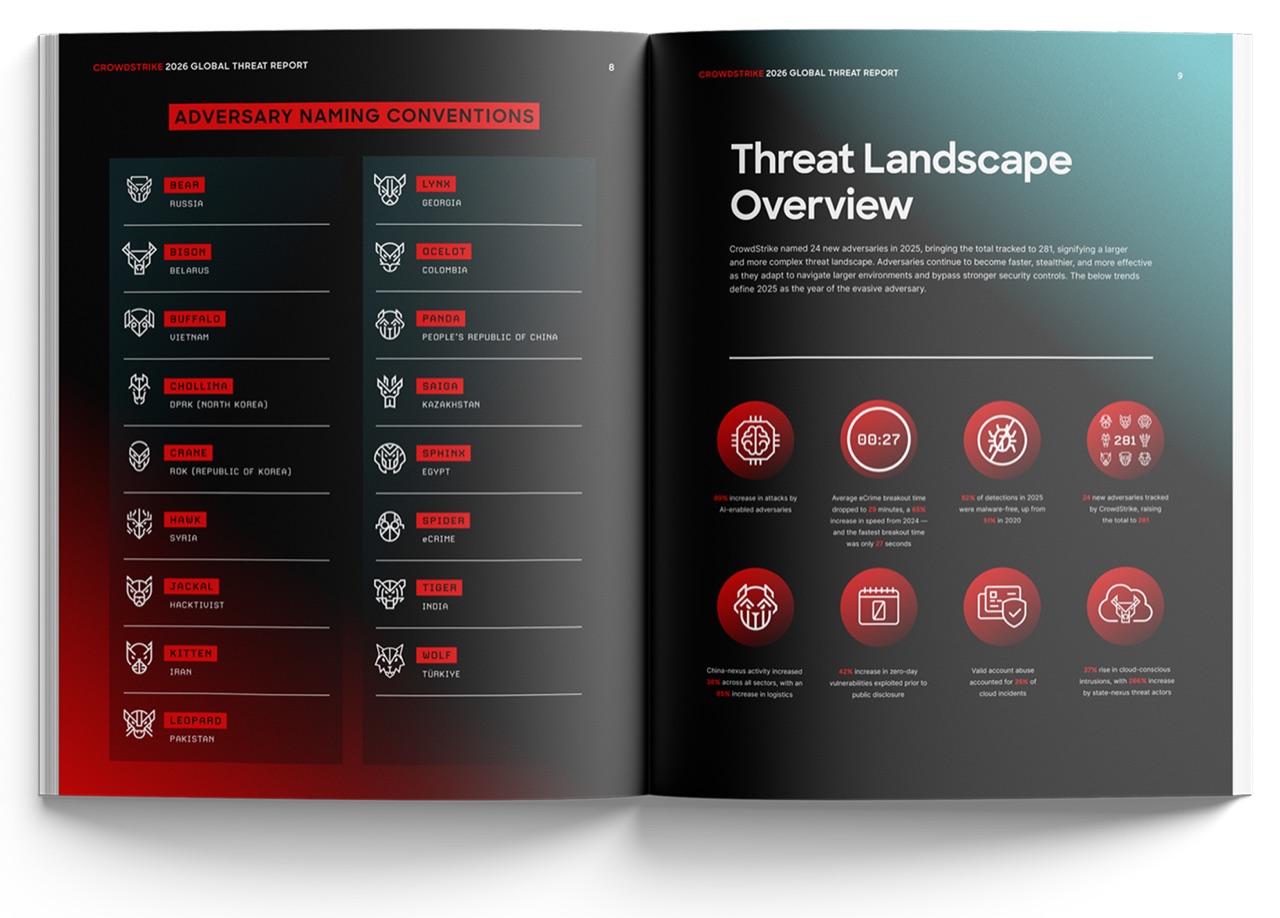
CrowdStrike’s 2026 Global Threat Report frames AI as an accelerator of adversary activity and an expansion of the attack surface. The company’s February release gives defenders a reason to examine their response processes, not merely purchase another product carrying an AI label.
The report is vendor research drawn from the activity CrowdStrike observes. It should inform the discussion without being treated as a complete picture of every attack against every organization.
For businesses adopting agents and connected AI tools, the immediate question is practical: can the security team understand and stop activity across accounts, applications, and devices quickly enough to limit damage?
Faster content creation is only one part of the problem
Public discussion of AI-assisted attacks often starts with convincing phishing messages. That is an understandable concern, but it can narrow the defensive conversation too much.
A malicious message becomes operationally important when it leads to account access, an unauthorized action, or the disclosure of useful information. The company’s identity controls and response process therefore matter as much as its employees’ ability to recognize suspicious prose.
An organization cannot safely assume that clumsy wording will expose every attempted deception. Nor should it assume that every polished message was created by AI. Defenders need controls that operate independently of writing quality.
CISA’s multifactor authentication guidance points businesses toward stronger account protection, including phishing-resistant approaches. That is a more durable foundation than training people to spot supposed stylistic fingerprints of machine-generated text.
Agents add identities that need owners
An AI agent may access information on behalf of an employee, use a service account, or connect to several applications. Each arrangement creates a different administrative question.
Who owns the credentials? What happens when the employee leaves? Can the agent continue acting after its original task is complete? Where does the business see what it changed?
These are questions about the organization’s deployment, not claims that all agents behave in the same way. The answers depend on product design and configuration. They belong in the onboarding process for any tool granted access to business systems.
An agent’s ability to read instructions from outside the company also deserves attention. A workflow may process customer messages, documents, or webpages. The business must decide whether that external material can influence the system’s actions and how sensitive steps are controlled.
The safest practical starting point is to give a workflow only the access and authority it needs. A convenient administrator credential should not become the default just because it makes a demonstration easier.
Detection is not the same as a completed response
Endpoint vendors describe automated capabilities that can reduce manual work. Microsoft Defender for Business and SentinelOne’s endpoint platform are examples of products documenting detection and response functions.
A buyer still needs to establish the sequence after an alert. Does the system act automatically? Does it require approval? Does the action apply only to one device, or can the account remain active elsewhere?
No product description can answer those questions for every customer configuration. The company should walk through its own likely incident paths.
A hypothetical compromised laptop illustrates the point. Isolating the device may stop some activity, but it does not necessarily resolve access through a stolen credential. The team must know which tools and people handle the account, related sessions, and downstream applications. A fast first action is valuable; an incomplete response can still leave the business exposed.
Small teams need simpler decisions
A large security team can distribute responsibility across specialist functions. A small business may have one administrator juggling security, procurement, and ordinary support work.
For that team, clarity is an important defensive capability. The administrator should know which alerts require immediate action, which service to call, and which business owner can authorize a disruptive step.
Buying additional dashboards without defining those decisions can increase the number of places a warning might appear. It does not automatically shorten the time needed to contain a problem.
CISA’s small-business resources emphasize basic controls including updates and account protection. A company should verify those foundations while assessing newer AI-related exposure. The presence of a novel threat does not make an unpatched application or weak account process less consequential.
Run an exercise before the real incident
Businesses can make progress without predicting which attacker will use which model. Choose a plausible scenario involving a sensitive account and one connected application. Define who notices, who investigates, who can revoke access, and who communicates with affected staff.
Run the exercise with the systems the company actually owns. Include an unavailable employee, incomplete information, and an action that could interrupt work. Record delays and uncertainty rather than grading the exercise on whether everyone eventually reached the expected answer.
There is also a limit to what this establishes. A tabletop exercise does not prove a security product’s efficacy or reproduce every adversary technique. It can expose missing ownership and unclear authority, which are problems a product demo may never reveal.
AI-assisted attacks give defenders another reason to reduce those gaps. The most useful response is not a promise that AI will defeat AI. It is a tested process that connects a warning to an authorized action and follows that action through to recovery.
Image: CrowdStrike